
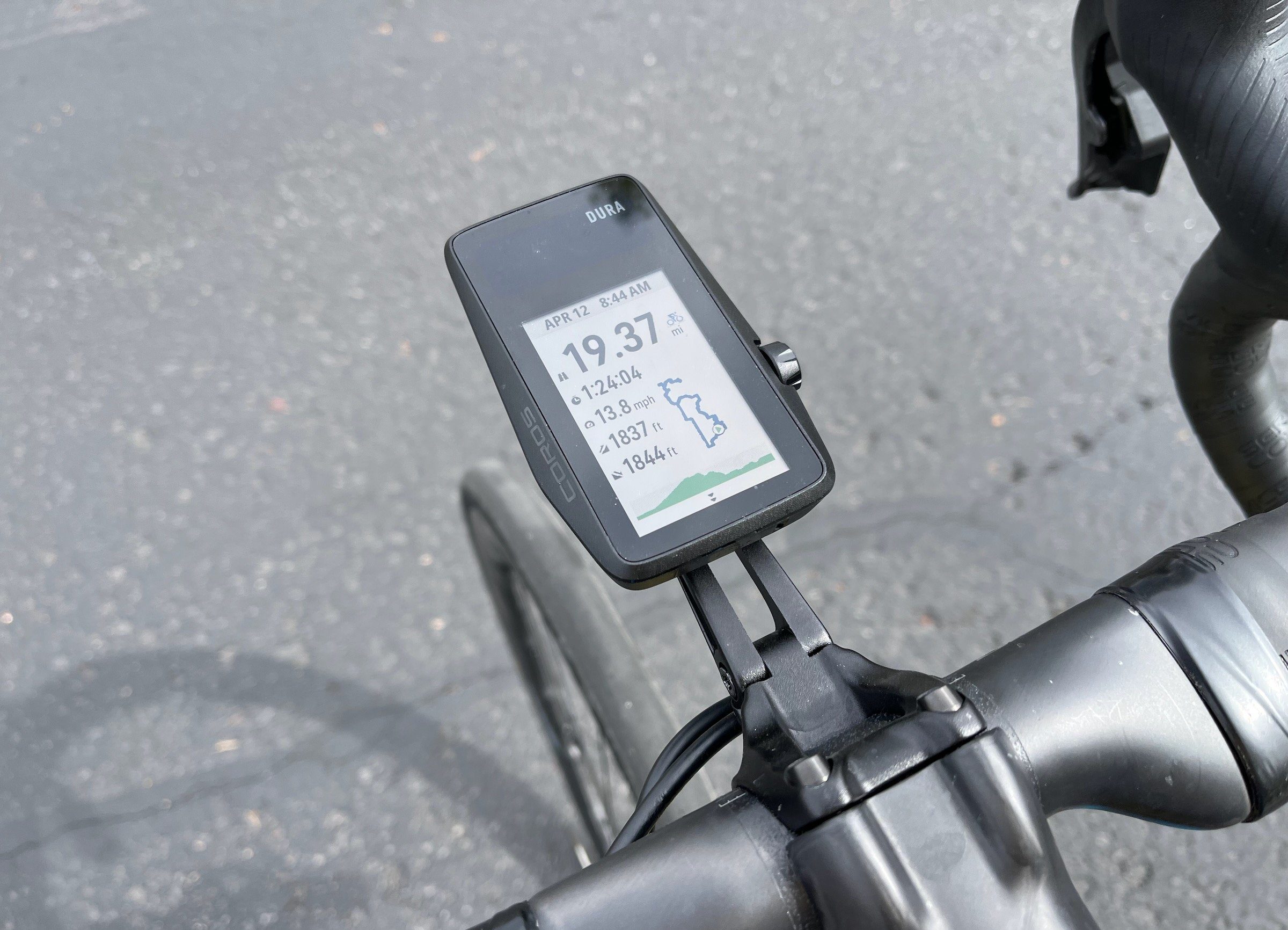

For real, the COROS Dura absolutely crushes the competition with its mega-long battery life. And, just about every other function of this bike computer is solid. If epic rides are your jam, the Dura has you covered — with a bright, crisp screen and clear data visualizations.
COROS Dura Bike Computer Features:
- 120 hours of ride time on a single charge with full GPS support
- Up to 2 extra hours of ride time per hour from solar charging
- Fully customizable 2.7″ MIP color screen with adaptive backlight
- Responsive touchscreen for simple and safe use on the bike
- Digital dial and single-button for one-finger control
- Dual-frequency satellite tracking with auto GPS mode selection
- Turn-by-turn and smart rerouting and global offline maps (powered by Google Maps)
- Syncs with COROS app for iOS/Android
- Bluetooth and ANT+ support for up to 12 accessories
- 2-year warranty
- MSRP: $250

The Long-distance Champion
There are bike computers and then there’s the COROS Dura. No, it doesn’t stand out because of industry-leading metrics or connectivity. Instead, it stands out because of the tiny solar panel (where the DURA label is) that can essentially extend ride tracking indefinitely — given the sun is shining. In my testing, the battery draw is always net zero when the sun is out. For epic long days in the saddle, I can’t think of a better bike computer than the COROS Dura.
Let’s take a step back and cover some of the wiggles I’ve had to work through before settling into the Dura. Upon arrival, the Dura was set to Simplified Chinese. All menus and labels were literally in Chinese and I had to resort to Google Lens to translate the menus until I could figure out how to change the language. Phew. Obstacle numero uno tackled. (Or in Chinese: ?????.)

The test unit arrived in late fall, so riding opportunities were slim. By the time I started testing the Dura in earnest, it was March and I ran into glitch number two. This time, I couldn’t get it to fully update the firmware on my home network. No matter how hard I tried, it would fail mid-update. The result was a half-baked update that put the unit into a wonky state. After some back-and-forth with the COROS team, I wiped the Dura from my Bluetooth connections, then brought it to my office and connected It to that network. And… it worked! Now that I was finally in business, I was eager to make up for lost time.
At the center of the Dura’s function is the scroll wheel, which complements the touchscreen function. All menus and layouts are intuitive and easy-to-understand. I’ve yet to refer to the manual and I’ve used every common function that I expect with any bike computer. Setting up my bike/rider profile was easy enough with the COROS app. Configuring the activity pages for road riding was easy and I found the visualizations to be superb. The combination of data points and corresponding widgets are refreshing and useful. Most units are a screen full of numbers, but not the Dura.

At-a-glance, I can quickly know which zone I’m in and other relevant data. Connected to the Trek CarBack or Wahoo TRACKR RADAR, I’m warned about approaching traffic with a beep and the radar lane on the unit. If vehicles approach at high speed, it flashes red and beeps louder. Once approaching traffic is gone, the radar lane disappears to increase screen visibility. There’s a radar icon in the upper-right that indicates it is active, even though the lane is off. While this is good for added visibility, I wouldn’t mind it staying and changing to green instead of disappearing.

Saved routes and on-screen navigation
The COROS Dura doesn’t have auto-climb detection unless you’re riding a saved route (not a deal-breaker, IMO). But, speaking of saved routes, it’s easy to load them and enable turn-by-turn directions. This is great for new routes or races. I loaded up a previous ride and followed it. Well, I also intentionally didn’t follow the route to see how re-routing works. While on lesser roads, the directions were hit-and-miss, but once I got onto main roads or bike paths, it remained solid. And, when I had to leave my route on a 5-mile detour, I was able to regain and re-follow the route with ease.


Touchscreen and connectivity
The scroll wheel and touchscreen combo is great until it isn’t. I love being able to drill Into menus before a ride and swipe between screens during a ride. But, sometimes the swipe gesture to return to the previous menu doesn’t work and you have to resort to the main button to go back. It’s not terrible, but just inconsistent. You can also change the orientation of the scroll wheel to make it intuitive for you. Where it counts, the touchscreen has been excellent.
Pairing the Dura with any number of Bluetooth or ANT+ accessories is straightforward. On any given ride, I’ve got three or more sensors (power, shifting, heart rate, radar). I can pair it up with the latest SRAM RED AXS gearing and power, Wahoo TRACKR HEART RATE, Polar Pacer Pro heart rate and the Wahoo TRACKR RADAR very easily. The only one that was finicky was the Polar Pacer pro (but it’s like that with all units). You can pair it with up to 12 devices. I connect to a variety of devices and haven’t exceeded that number.

I really appreciate that COROS has utilized the Garmin mount standard. It makes things easy since every out front mount I own is compatible. Because of that, I didn’t even use the included mount, but it looks solid. Popping it into the mount and out has been solid, consistent and secure.
I’m at the point in my life where I need reading glasses to see things up close, but the bright screen and large display was always crisp and clear for me. Of course, I could reduce the display size and squeeze more data on there, but my usual ride data includes: Power and power zones, cadence, speed, distance and heart rate. The display size, metrics and screen clarity honestly nails it for me and the data I care about. Like any bike computer, I’m scratching the surface on all the capabilities, but it does what I want it to and excels at it.
Buy Now: Visit COROS.com
The Bottom Line
The COROS Dura isn’t just another bike computer—it’s a long-haul legend. With a jaw-dropping 120-hour battery life (plus solar charging that actually works), it’s built for epic rides and then some. The crisp screen, intuitive touchscreen/dial combo, and excellent data visualizations make it a joy to use, even if some early firmware and setup quirks need ironing out. If you’re logging serious miles, the Dura delivers where it counts.
The Good:
- Crisp screen that's easy to read
- Data visualizations are outstanding
- Syncs reliably with the COROS iOS app
- Configuration is straightforward
- Touchscreen, dial and power button functions are intuitive 95% of the time
- Solar power extends ride time almost indefinitely
- Garmin quarter-turn FTW
The Bad:
- Initial firmware wonkiness was easy to forget once updated
- Arrived in Simplified Chinese
- App does feel dated compared to Wahoo or Hammerhead
- Technology/Ecosystem
- Accessory Connections
- Screen Readability
- Ease-of-use
- Accuracy
- Battery Life
