


When it comes to bike computers, there are really three primary brands: Wahoo, Garmin and Hammerhead. Everyone has reasons why their chosen brand is their favorite. And, for me, after using each one, I have to give the nod to Wahoo. The ELEMNT ROAM V2 delivers an intuitive user experience, a large screen and the best ecosystem on the market. To better understand my reasoning, I’ll outline just what makes the Elemnt ROAM so great.
Wahoo ELEMNT ROAM V2 GPS Bike Computer Features:
- Bright, 2.7″ 64-color display with Gorilla Glass screen
- Ambient light sensor for optimal brightness
- Dual-band GPS
- Turn-by-turn directions
- Summit Climbing auto-detects climbs
- Tactile buttons
- Up to 17 hours of run time
- USB-C charging port
- Connect with and control a variety of ANT+ devices
- Configurable left and top LED lights
- Music and GoPro controls (coming soon)
- MSRP: $399.99

Configuration and ecosystem
When considering a GPS bike computer, tops on the list is ease-of-use. Can I easily power it up and get going without having to pour through manuals or online FAQ’s? It is 2024 after all and Apple has spoiled us with intuitive products and elegant designs. Wahoo fancies themselves to be the Apple of bike computers and I think they do a pretty good job of that. Packaging is sleek and the user-interface is clear and intuitive. Unlike other units, I don’t ever wonder what each button does and I never get lost in the menus. Sadly, I couldn’t say the same thing with the Garmin Edge 540.
Paring up my iPhone 13 Mini is a breeze and it’s not only easy to manage settings on there, it’s equally-easy to manage everything on the ELEMNT ROAM. And, Wahoo allows you to manage the data layouts mid-ride. I found myself showing or hiding heart rate or power when riding a test bike, for example. That’s simply not possible with other units. And, the clean and modern mobile app is far superior to what you’ll find with other brands. I also appreciate how you can zoom in/out of each screen to focus on data elements — that also kind of works like mid-ride configuration. It really is the best of both worlds.
The biggest feature gap compared to Garmin and Hammerhead is the lack of having multiple profiles for different bikes. This did come into play when I didn’t have a power meter or a heart rate monitor when riding different test bikes. It can be minimized by having a dedicated screen for each bike, for example. It’s not ideal, but that’s the best solution here.

Usability and reliability
One of the notable changes between the ROAM V1 and V2 are the three primary buttons. The original version has recessed buttons while the V2 features raised buttons. The difference in usability is dramatic. I did (and still do) have occasional trouble depressing the buttons on the V1 unit that I still use regularly. With the raised buttons on the ROAM V2, it is so much easier to navigate and interact with. Mostly, it’s appreciated, but I do feel like Wahoo may have swung the pendulum just a touch too far because occasionally it is too easy to press the buttons and I have found myself double-pressing the buttons while riding.
All of Wahoo’s head units are laid out well and each button is either logical or labeled for each action. The power button only does two things — power on/off and go back a step in the menu. And, the scroll up/down buttons on the right side just scroll the view or cursor up/down. There are no buttons on the opposite side to get inadvertently pressed while trying to keep the unit from twisting in the mount mid-ride (something I found annoying with the Garmin Edge 540).

Double-clicking on this further. The power/back button sits in the middle of the unit, so pressing it won’t rotate it in the mount. And, the up/down buttons on the right side will not move the unit in the mount either because it won’t rotate that direction. Wahoo easily wins the button competition.
Battery life is also outstanding and superior to the Edge 540 as well. It sips on battery — even with a host of sensors connected. I’m always surprised to see the battery percentage after a couple hours in the saddle, or after leaving the unit for several weeks without charging.

Pairing sensors is always a breeze and I have connected a ton of sensors, including SRAM AXS, Shimano Di2, Polar Pacer Pro HRM, Ticker X, Bontrager Flare lights, Trek CarBack, Garmin Varia and others. Pairing is drop-dead simple and has worked every time using ANT+ and Bluetooth connections. It can also use either Bluetooth or a connected WiFi for updates and syncing.
Wahoo’s head units have always been accurate and reliable (as opposed to the ELEMNT Rival Watch). All data and metrics are within acceptable tolerances of Garmin, Suunto, Polar and Apple when testing. And, at the end of any ride, it syncs with Strava faster than I can even think. When I arrive at my garage and stop the ride, I get a Strava notification faster than I can even walk to the shelf to remove my helmet and gloves. I haven’t had a single dropped ride or glitch in two years of use.

Other noteworthy features
Wahoo has every feature you could ever want in a bike computer. I haven’t found a single one that was missing. Of course, like the competition, you can expect to have these:
- Turn-by-turn navigation with planned or unplanned routes
- Messaging with the ability to control what shows
- Radar control with additional configuration
- Strava Live Segments
- Summit Segments for automatic climb detection
- Live tracking
- GoPro controls are coming (will test once available)
Those are just a few of the features you can expect with the ROAM V2. If I can find fault with Wahoo, in general, it can be their eagerness to add yet another feature. Tops on that list is the new “Ready to Ride” start screen. Not once did I feel overwhelmed or lost when I needed to add a sensor or change a setting. I do see how some riders might appreciate it, but it’s not a feature I’m enamored with. A quick glance of the sensors paired is about all I need.
Summit Segments are Wahoo’s answer to similar technology found on both Garmin and Hammerhead. It is nice to have when riding an unfamiliar route, but isn’t as helpful if you know the terrain. Again, a handy “me too” feature that I do appreciate under certain circumstances.
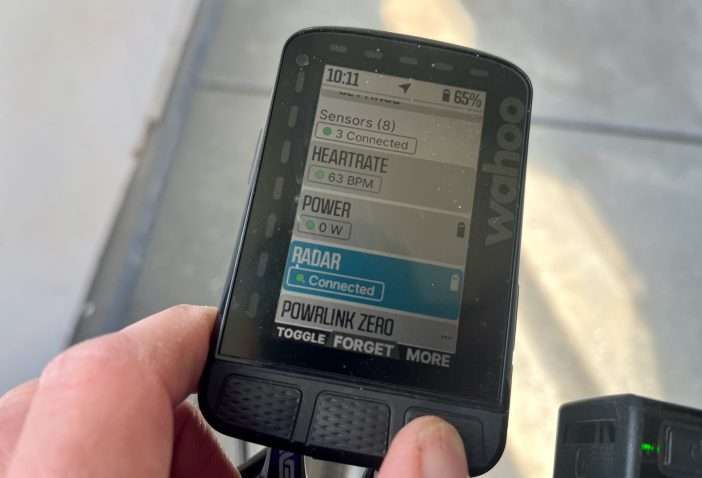
The differences between the V1 and V2 unit are more than just the buttons. The dual-band GPS adds improved tracking and the screen colors, brightness, depth and layout are definitely easier to read under a variety of light conditions. Honestly, the ROAM V2 is the easiest screen to view in even the brightest light. Characters are crisp and nothing is too small to read when bouncing around rough roads or gravel. And, even though I have 20/20 vision, I need reading glasses these days to read the small print, but can always read everything on the ROAM’s screen.
Buy Now: Wahoo’s Amazon Store
The Bottom Line
It's pretty easy to tell how much of a fan I am of the Wahoo ecosystem. Not every one of their products are home runs, but the ELEMNT ROAM V2 is one of those. With a crisp display that's easily-customized and the ability to connect it to just about anything besides the kitchen sink, the ROAM V2 is my personal bike computer of choice. The only feature gap is the lack of multiple bike profiles, but it's not enough to knock it off the podium.
The Good:
- Wahoo's ecosystem is by far the best in the industry
- Reliable measurements
- All buttons are easy to use and properly placed
- Three hero buttons make detailed actions a breeze
- Auto brightness is perfect for a variety of light conditions
- Additional colors add pop
- Radar mode is the best out there
The Bad:
- Pricey, but on par with comparable units
- Main buttons may be a little too easy to press
- No profiles for multiple bikes
- If a starred segment is nearby, the page can get hijacked
- Technology/Ecosystem
- Connections
- Screen Readability
- Ease-of-use
- Accuracy

4 Comments
Agree with the above review. My other observation is that the unit randomly flits between pages now and again.
I also don’t like that Wahoo don’t show how much the unit is charged when recharging it switched off.
Good points on the charging status and randomly switching pages. I have found that it does switch pages when there is a starred route nearby and that is definitely annoying. I appreciate your added feedback and experience, David!
Hi Jason
Great review. Thank you. I also am a great fan of the Wahoo Roam 2 and in 2023 I had the opportunity to test it directly against a Garmin Edge 1030+. We were a team of two cyclists, Paul and myself. We cycled from London to Kiev -3,200Km – I had the Roam 2, Paul the Garmin 1030 Plus. Paul had problems almost every day of the 25 day ride. These included:
1. Consistently running out of battery. To be fair I am sure he set it up incorrectly but the max he could get was 9 hours a day and often less than 8.
2. Not following or failing to find the route we shared divided up on Strava into daily stages.
3. Very slow start in the morning. Invariably I just used my Wahoo from start to finish for every day of the ride. And Paul’s was used as a back up. Which did actually prove useful on one or two occasions.
My problems with the Roam 2:
1. Rerouting was a slight problem until I learnt how it thought and acted. That was where Paul’s back up Garmin came in useful.
The biggest difference each day we found was battery life. Paul’s would die around 3pm to 4pm. Whilst I always had about 60% or more left each day. We tried many times to reconfigure Paul’s Garmin but never got good battery life out of it. The Garmin just generally proved inferior in most areas of use. The one thing I liked about the Garmin was the how many kilometres left to ride feature. But now I have found that on my Roam 2 so no problem.
As an extra point let me also say I live and cycle year round in the Southern French Alps. In winter I regularly ride in sub zero conditions. Again in 3 winters of riding with the Roam 2 I have only 2 problems. The first was when it did not record the altitude accurately. I put this down to-5C temperatures and not waiting long enough outside before starting. Secondly in only 0Centigrade temperatures the screen went blank for 10 minutes. I pressed various buttons but just got this strange flashing series of yellow let’s. I stopped and the Roam resumed the ride as if nothing had happened. Once home I checked the route, which I ride alot so I know it, and all data seemed to be accurate.
In summary, having tested a number of bike GPS either myself or via shared rides with other units I find the Wahoo Roam the best. It’s definitely better than the Roam 1, and every other Garmin I have tested. Thanks again Jason for your great reviews.
Jerry Gore
What an incredible testament to the function of the ROAM V2! Thank you for your thorough experience and for sharing your thoughts on this bike computer! Allez!